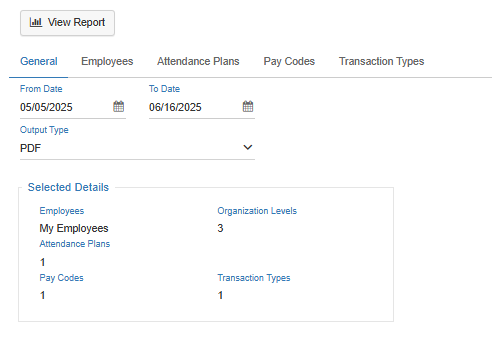
Parameters Screen
LightWork reports are entirely customizable based on desired Parameters that filter the report results to provide you with the most useful insights into your data.
-
Date Range
Located within the 'General' tab, allows the User to make a Date Range selection by filling out the 'From Date' and 'To Date' giving specific control over the timeframe queried as part of this report (this selection is only available for reports that aren't specific to plan year totals). -
Output Type
Located within the 'General' tab, the 'Output Type'allows you to select the method in which your report is delivered. All reports can be exported into a PDF or Excel format.
Note: If the PDF method is selected a new tab will be opened which may be prohibited by pop-up blockers. If the Excel method is selected the report will be brought directly into a CSV file to open in Excel and formatting may be affected. Formatting may require manual intervention. -
Employee(s) Selection
Located within the 'Employees' tab, a User can select 'My Employees' (Employees who have been configured for your User to have access to within User Security such as Direct Reports), 'Specific Employees' (Employees selected from a list of Employees your User has access to), or 'Selected Company/Organization Levels' (which would allow you to refine results based on company as well as company specific Organization Levels available in the system such as Division, Department, and Location). -
Attendance Plans Selection
Within the 'Attendance Plans' tab, a User can assign the specific Attendance Plans they would like the report to limit by. If none are moved to the 'Assigned' section then all 'Available' options would be applied as the parameter for Attendance Plans. -
Pay Codes Selection
Within the 'Pay Codes' tab, a User can select 'All Pay Codes' to retieve the results based on all available Pay Codes, or they can select 'Specific Pay Code' to assign the specific Pay Codes they would like the report to limit by. When 'Specific Pay Code' is selcted, if none are moved to the 'Assigned' section then all 'Available' options would be applied as the parameter for Pay Codes.
Note: This parameter is only available for reports that utilize Pay Codes as part of the information provided to the user in the report deliverables (Absence Log report, and Transaction Log report). -
Transaction Types Selection
Within the 'Transaction Types' tab, a User can assign the specific Transaction Types they would like the report to limit by. If none are moved to the 'Assigned' section then all 'Available' options would be applied as the parameter for Transaction Types.
Note: This parameter is only available for reports that utilize Transaction Types as part of the information provided to the user in the report deliverables (Transaction Log report).